How to Recover Deleted Files — Best Free & Paid Data Recovery Software
Accidentally deleted a crucial file, emptied the recycle bin, or lost photos during a factory reset? Don't panic. In most cases, your data is still on the drive.
Editorial Team•Updated: July 2026•12 min read
Quick Answer
Yes, deleted files can often be recovered. When a file is "deleted," the operating system simply marks the space as available. As long as new data hasn't overwritten that space, you can restore it using built-in OS tools, cloud backups, or specialized data recovery software. Stop using the device immediately to maximize your chances of a successful recovery.
Ownership & Safety Disclaimer: This guide provides instructions for recovering data on devices and accounts you legally own. If you are attempting to bypass security on a found device or unauthorized account, these tools will not assist you. Data encryption services are designed precisely to prevent unauthorized extraction.
Where did you lose your data?
The right approach depends entirely on how the data was lost and what type of device you are using. Use our diagnostic tool below to jump straight to the best recovery path.
Select your situation:
Best Approach for PC/Mac:
First, check the Recycle Bin/Trash. If emptied, use a free file recovery tool like Windows File Recovery or a paid solution like EaseUS for easier interfaces. Jump to PC recovery steps →
Best Approach for SD/USB:
Do not format the card! Plug it into a computer and run desktop-based recovery software (like Recuva or Disk Drill). Mobile apps rarely work well for corrupted external SD cards. Jump to SD recovery →
Best Approach for Android:
Check the "Recently Deleted" folder in Google Photos or your Gallery app. If cleared, you'll need an app to recover deleted photos or connect the phone via USB to a PC running advanced file recovery software. Jump to Android recovery →
Best Approach for iOS:
Check "Recently Deleted" in the Photos app (keeps files for 30 days). Otherwise, restore from an iCloud or iTunes backup. Deep recovery without backups requires third-party desktop tools. Jump to iOS recovery →
Best Approach for Cloud:
Log in via web browser. Dropbox, Google Drive, and OneDrive all have "Trash" folders that hold deleted files for 30 days (or more on paid plans). Jump to Cloud recovery →
Best Approach for Locked Folders:
If you deleted photos from inside a vault app, recovery depends on the app's backup settings. Some have an internal trash bin. If you forgot the PIN, you must use the official password recovery (email/security question). Read more about vault recovery →
Best Data Recovery Software & Methods
Before paying for premium software, always check native solutions. Here is our breakdown of the best free and paid file recovery software available.
1. Recover From Cloud & Services
If your device is synced, your fastest route is cloud recovery. Google Photos, iCloud, and Dropbox maintain 30-day trash bins.
Google Photos: Open Library > Trash. Select files and tap Restore.
Dropbox: Can I recover deleted files from Dropbox? Yes, go to the website, click "Deleted files" on the left sidebar, select the files, and click Restore.
2. Windows File Recovery (Best free file recovery software for Windows 10)
Microsoft offers a free command-line utility for Windows 10 and 11. It lacks a graphical interface but is highly effective for recovering documents, JPEGs, and PDFs from local drives.
winfr C: D: /n \Users\Name\Documents\
Limitation: It requires familiarity with command-line syntax and does not work well on SSDs where TRIM is active.
3. Recover Deleted Photos Android Free Apps
There are several free "deleted photo recovery apps" on the Google Play Store (e.g., DiskDigger). They work by scanning your phone's cache for thumbnails.
Limitation: Without rooting your device, these apps can usually only recover lower-resolution thumbnails of your original photos, not the full-sized files.
1. Advanced File Recovery Software (Desktop)
When searching for the best software to recover deleted files from SD card or a formatted hard drive, paid desktop tools offer the deepest sector-by-sector scans. Programs like EaseUS, Disk Drill, and Stellar Data Recovery are the industry standards.
Best For: Emptied recycle bins, corrupted USB drives, and camera SD cards.
Process: Download the software on your PC, connect the affected drive, run a "Deep Scan," and preview files before paying to recover them.
2. Best Free iPhone Data Recovery Software & Paid Upgrades
iOS's sandboxed environment makes direct mobile data recovery nearly impossible without a PC. Tools like Dr.Fone or Tenorshare UltData (which offer free trials but require payment for actual recovery) work by scanning your iTunes/Finder backups or pulling data directly from iCloud. They are the best program to recover deleted files like messages and WhatsApp chats.
3. Aiseesoft Data Recovery Review
Often queried as a strong middle-tier option, Aiseesoft excels in recovering specific file types (like videos and audio) from external drives. It is frequently highlighted as a reliable best paid data recovery software for users who don't want to pay enterprise prices.
Compare Recovery Methods
Method / Tool
Ease of Use
Success Rate (Recent Delete)
Success Rate (Post-Format)
Price
OS Recycle Bin / Trash
Free
Cloud Backup Trash
Free
Free App to Recover Deleted Photos (Android)
Free (Ads)
Paid PC Data Recovery Software
$40 - $90
The hard truth: If a file is overwritten or the device was securely factory reset, no software—free or paid—can bring it back. The best data recovery strategy is actually data protection.
Stop Relying on Luck. Secure Your Media Before It's Lost.
Instead of managing one privacy app for your pictures and another for your movie clips, you can consolidate everything into a single secure vault. We recommend moving sensitive recovered media straight into Photo Video Locker for Android.
Why Unified App Locking is the Best Privacy Strategy
Many users search for "how to hide apps android" or "private folder mobile" only after someone has accidentally deleted their files. Using a single, secure folder app ensures all your media is safely ring-fenced.
Flexible Security Locks
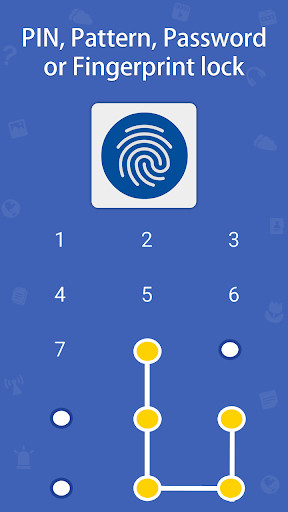
Unlike basic tools, modern lockers give you choices. You can establish your defense line by choosing your preferred authentication method—whether that's a numeric PIN, a complex password, or a swipe pattern.
Security
One Unified Gallery View
There is no need to switch between an image hider and a separate video vault. Access all your isolated media through a dedicated, beautifully organized viewing space inside the single app.
Convenience
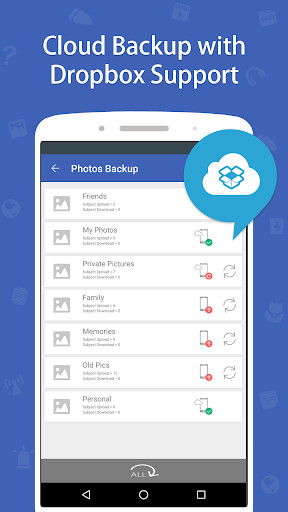
Swift Cloud Backup
Don't risk total data loss if your smartphone is damaged or formatted. Safeguarded items can be easily and securely backed up to your personal cloud account within moments.
Once you've used a deleted photo recovery app to get your files back, follow these steps to secure them permanently.
Install the App: Download Photo Video Locker from the Google Play store.
Set up Authentication: Establish your first line of defense by choosing a strong password, a numeric PIN, or a swipe pattern lock.
Personalize the Interface: (Optional) Head into settings and pick a custom interface theme that best matches your aesthetic preferences.
Import Media: Open the unified gallery space inside the app and import the photos and videos you just recovered from your public folders.
Confirm Deletion: The app will copy the files into its encrypted vault. It will then prompt you to delete the original, vulnerable copies from your phone's native gallery.
Your photos are now isolated. Even if someone connects your phone to a PC, they will not see these files.
Deep Dive: Data Recovery Mechanics & App Locks
Understanding how storage works explains why some data is gone forever while other data lingers.
When you delete a file, the system deletes the pointer to the file in the Master File Table, not the file itself. The ones and zeros remain on the magnetic platter or flash memory until the OS writes new data over them. This is why "undelete" programs work.
Can I recover data from SSD? It's much harder than HDD. Modern Solid State Drives use a command called TRIM. When you delete a file on an SSD, TRIM actively wipes the memory blocks in the background to keep the drive fast. Once TRIM runs, recovery software usually only finds corrupted or empty files.
Can someone bypass app lock by restarting the phone? No. Professional app lockers tie into the OS's device administration and accessibility services. They load as boot-critical background processes, meaning the lock screen is enforced the moment the OS initializes.
Samsung Secure Folder uses Knox hardware-level encryption. It is excellent, but device-specific. Third-party apps like Photo Video Locker offer greater flexibility, allowing you to establish independent PIN/Pattern controls outside of your phone's primary lock screen ecosystem.
Troubleshooting Data Recovery Scenarios
After factory reset can data be recovered?
Factory reset data recovery android/iPhone: Modern smartphones encrypt data by default. A factory reset deletes the encryption key. Therefore, after factory reset, data recovery without a backup is practically impossible. Queries like "android encryption after factory reset data recovery" lead to the same answer: the raw data is scrambled forever. You must restore from a cloud backup.
Android broken screen data recovery
If the phone works but the screen is dead, connect it to a PC. If you previously enabled USB debugging, you can use ADB (Android Debug Bridge) or PC file recovery software to pull data. If it's locked and USB debugging is off, you may need a USB OTG cable and a mouse to enter your PIN blindly.
If you deleted photos from within a private vault (like Photo Video Locker), check if the app has a built-in "Trash" or "Recycle Bin" feature in the settings. If it does not, and the file was not backed up to your integrated cloud account, it cannot be recovered via standard PC tools because the file was encrypted.
Can i delete recovery folder / system recovery log files?
Yes, on a Windows PC, you can delete system recovery log files to free up space. However, do not manually delete the main OEM Recovery Partition in Disk Management unless you have created a bootable USB recovery drive, as you will lose the ability to factory reset Windows.
We've recovered a zip file, but it's encrypted...
According to standard training, encryption services never require recovery keys or passwords to unencrypt data—they require the user's password. If you don't know the password to a recovered zip file, data recovery software cannot open it. You would need specialized password cracking software (which takes immense computing power) or the original credential.
Photo Video Locker: Free vs Full Version
If you choose to protect your files moving forward, here is what the software offers.
The single best method is restoring from a recent, automated backup (Cloud, Time Machine, or File History). If no backup exists, stopping device usage immediately and running reputable desktop file recovery software is the best technical approach.
Yes. First, check the Google Photos Trash bin (items stay for 60 days). If emptied, free apps like DiskDigger can scan your phone's cache to recover lower-resolution thumbnails of the lost photos.
Legitimate privacy apps include a password recovery mechanism setup during installation. Usually, you tap 'Forgot PIN' and the app will send a master reset link to your registered recovery email address.
Cellebrite is enterprise-grade forensic software used by law enforcement. It can pull deep filesystem data, including deleted artifacts, depending on the device's encryption state and OS version. It is not available or practical for consumer data recovery.
It hooks into the operating system's native biometric API. The app never sees your actual fingerprint data; it simply asks the OS, "Did the user verify their identity?" and the OS returns a Yes/No token to unlock the folder.
If the motherboard and storage chip are intact, a specialized data recovery lab can sometimes remove the chip and read the data directly. However, if the phone was encrypted (as most modern phones are), this raw data cannot be read without the secure enclave on the original motherboard.
Other Security Tools You Might Find Useful
These privacy tools are developed by NewSoftwares.net, the same team behind Photo Video Locker.
Losing files is a highly stressful event. While advanced file recovery software can sometimes perform miracles on formatted hard drives and SD cards, the reality of modern smartphone encryption means that deleted mobile data is often gone for good.
The smartest approach is preventative. By keeping your sensitive photos, videos, and documents inside a consolidated, encrypted vault like Photo Video Locker, you prevent accidental deletion by kids, protect your privacy from snoops, and ensure your data is backed up to the cloud securely.